General Page
Use the General page of the Group Service editor to configure general node properties.
|
Group Service Editor - General Page |
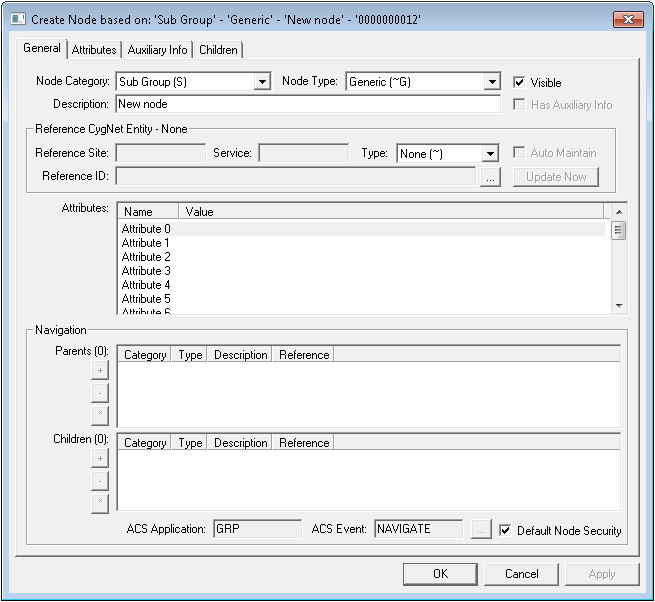
General Page Properties
The following table lists and describes the General page properties of the GRP editor.
| Property | Description |
|---|---|
| General | |
|
Node Category |
A node category indicates the position and role of a node within a hierarchy. It can be a system- or user-generated, internal node reference. Node categories are as follows:
For more information, see Node Category, Type, and Attribute Identifier. |
|
Node Type |
A node type is a description of an individual node. It can be a system- or user-generated, internal node reference. Node types are as follows:
For more information, see Node Category, Type, and Attribute Identifier. |
|
Visible |
Select to make this node visible in the GRP. |
|
Description |
Free-form text box used to define the node. |
|
Has Auxiliary Info |
Select to indicates whether auxiliary information exists for this node. You can access the auxiliary data on the Auxiliary Info page for this node. |
| Reference CygNet Entity - [Type] | |
|
Reference Site |
Defines the site for a reference entity associated with a node. |
|
Service |
Defines the reference service for a reference entity associated with a node. Typically a UIS. For instance, if the node references a remote device facility, the Service is a UIS. |
|
Type |
Defines the reference Type for a reference entity associated with a node. Select the appropriate option from the Type drop-down menu. Reference types are as follows:
|
|
Auto Maintain |
Obsolete |
|
Reference ID |
Defines the ID of the item referenced by a reference entity. Available selections depend upon the Type chosen. |
|
Update Now |
Click to update the reference entity information after you've made reference entity settings changes. |
|
Attributes |
List of all standard attributes for the node. Attributes depend on settings made in the Reference CygNet Entity - [Type] area. For more information, see Node Category, Type, and Attribute Identifier. |
| Navigation | |
|
Parents |
A parent in a parent - child hierarchy is a superior entity. For example, a view is a parent of a level. This table lists the parent(s) for the selected node. Double-click a parent to change the properties of the property sheet to those of the parent. Command options for this field are as follows:
|
|
Children |
A child in a parent - child hierarchy is an inferior entity. For example, a level is a child of a view. This table lists the child(ren) for the selected node. Double-click a child to change the properties of the property sheet to those of the child. Command options for this field are as follows:
|
|
ACS Application |
Security application for the selected node. |
|
ACS Event |
Security event for the selected node. |
|
Default Node Security |
Check to accept the default security for the selected node. |
 If active, enables you to add a child.
 If active, enables you to remove a child.
 If active, opens the selected child node's General record.

